[DxBP] Part 2 - Deepdive into the Detection: Performance, Readability & Maintaiable
In the second part of the DxBP series we deepdive into the logic of the detections. This blog describes multiple best practices that apply to the operators and functions used in your detections to make them better performing, readable and maintainbable. Once you have drafted an awesome query that detects the desired malicious behaviour you need to make sure that it will perform well, EDR vendors only give a certain amount of CPU cycles per tenant. Performance matters.
At the same time, you’re not the only one who interacts with your detection logic. Other detection engineers, threat hunters, and security analysts will review your detections, for example in pull requests or triage the resulting alerts. Clear, structured, and well designed queries make it easier for everyone to understand the intent behind your detection and can improve the quality of your SOC workflows.
Performance
Starting off with performance as you want your detections run effectively and do not utalize to much resources. We all know the 100% resource utalization error that we want to avoid by all means as it’s a tenant wide pool. Better performing queries also allow for more rows to be processed within the query, so a win win scenario.
Using the right operators
Detections need filtering to list the suspicious activities a detection is aimed to detect. There are a lot of different operators that can be used to filter, such as contains, has, equals, !=, startswith, in, has_all, etc. Selecting the right operator helps for performance, readability and better outcomes.
| Operator | Description |
|---|---|
== |
Exact equality comparison. Case sensitive. |
=~ |
Case-insensitive equality comparison. Recommended because log formats are not standardized. |
!= |
Case-sensitive inequality comparison. Evaluates to true when values are not exactly equal. |
<> |
Alternative syntax for inequality. Functionally equivalent to !=. |
contains |
Checks whether a string contains the specified substring. |
contains_cs |
Case-sensitive version of contains. |
has |
Checks whether a string contains the specified term as a token, based on delimiters. |
has_cs |
Case-sensitive version of has. |
startswith |
Checks whether a string starts with the specified substring. |
endswith |
Checks whether a string ends with the specified substring. |
in() |
Checks whether a value matches any value in a list. |
in~() |
Case-insensitive version of in(). |
has_any() |
Returns true if the string contains any of the specified list items as tokens. |
has_all() |
Returns true if the string contains all specified list items as tokens. |
Has vs Contains
A common question asked during Kusto sessions is the difference between has and contains. has searches for terms based on delimiters (like spaces and punctuation), meaning it only matches complete tokens as they are indexed, which makes it faster and more precise. contains ignores term delimiters and scans for any substring within the text, making it more flexible but less efficient since it cannot take advantage of tokenized indexing.
Thus, Has is more optimized than contains, but does not work in all scenarios. The examples below show when the result is true with contains and has.
let HasvsContains = datatable (Text:string)
[
    "DetectionEngineering",
    "Detection Engineering",
    "Detection-Engineering",
    "Detection_Engineering",
    "DetectionEngineeringRules",
    "AdvancedDetectionEngineering",
    "EngineeringDetection",
    "Detection Engineering 123"
];
HasvsContains
| extend ContainsDetection = Text contains "Detection",
  HasDetection = Text has "Detection"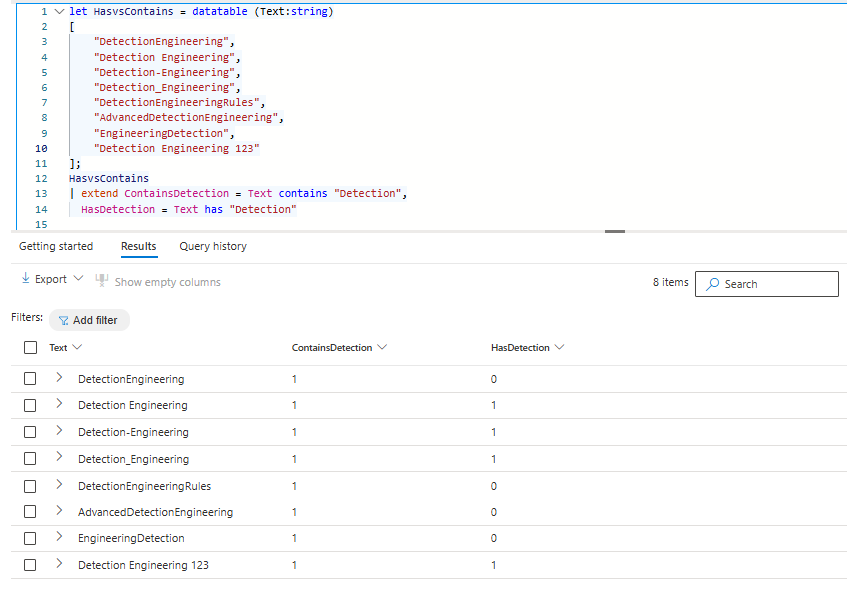
When working with has or contains in detections the question that needs to be answered is whether the substring you need to filter on is between delimiters. If this is always the case than has is the goto operator. If this is not the case contains is most likely the safer bet, however it is better to see if you can parse the data you have to be able to do has or =~ opertations. Has searches can be done based on a list using the has_any() operator, with the current supported KQL operators there is no such operator for contains, an or statement is the only solution at this point in time.
CPU Resources
The four examples below would all return the the same result, but only one is using an optimized operator for this specific scenario which is the in~ one. The in() operator is a multistring equals (OR), it will perform the best compared to the other two examples. When executing these queries over the past 30 days in Log Analytics workspace the query details show the differences that are summarized in the table below.
| Operator | Execution Time | Total CPU Usage |
|---|---|---|
contains |
863 ms | 171 ms |
has |
358 ms | 78 ms |
=~ |
624 ms | 93 ms |
in~ |
415 ms | 31 ms |
DeviceEvents
| where ActionType contains "ScheduledTaskUpdated" or ActionType contains "ScheduledTaskCreated"
or ActionType contains "ScheduledTaskDeleted"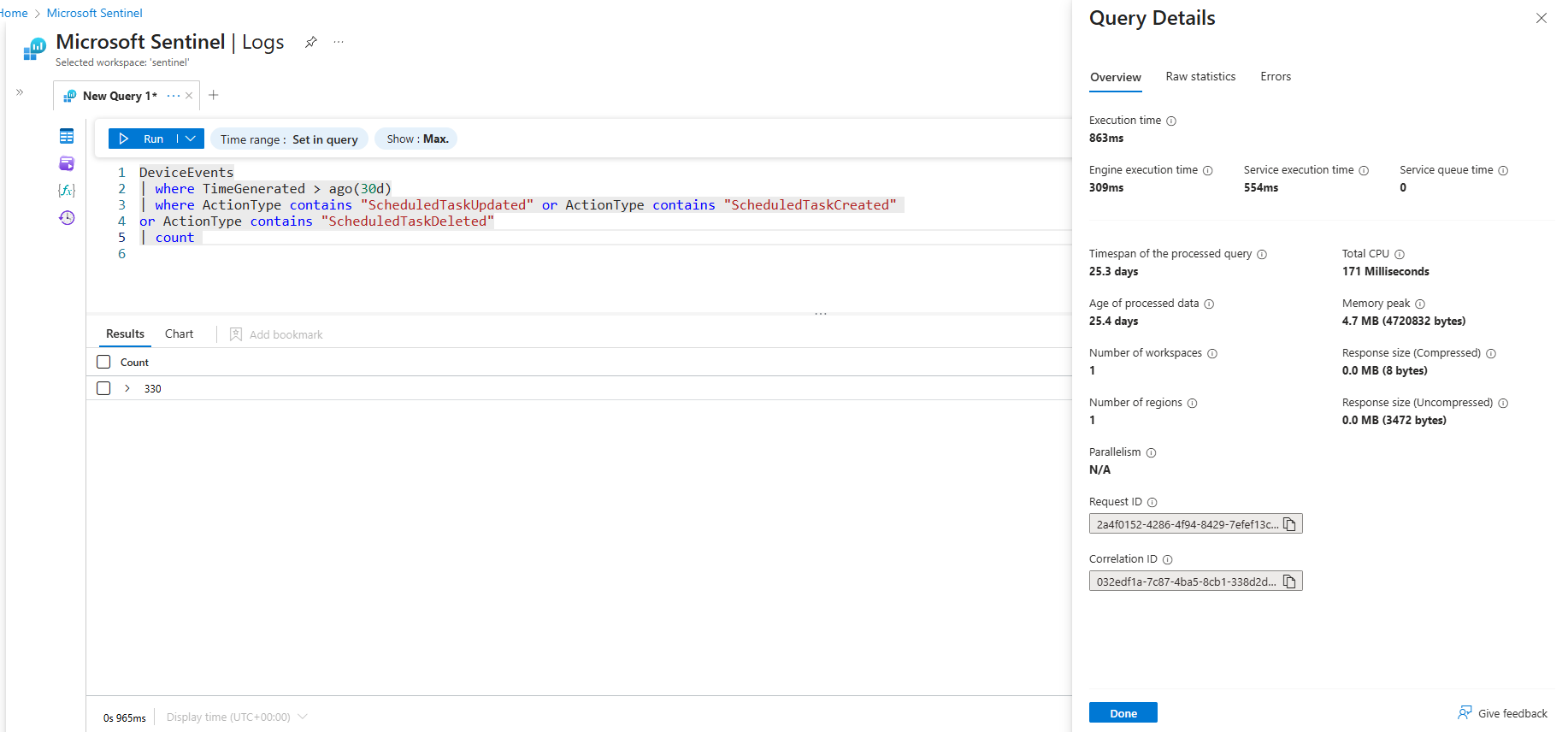
DeviceEvents
| where ActionType =~ "ScheduledTaskUpdated" or ActionType =~ "ScheduledTaskCreated"
or ActionType =~ "ScheduledTaskDeleted"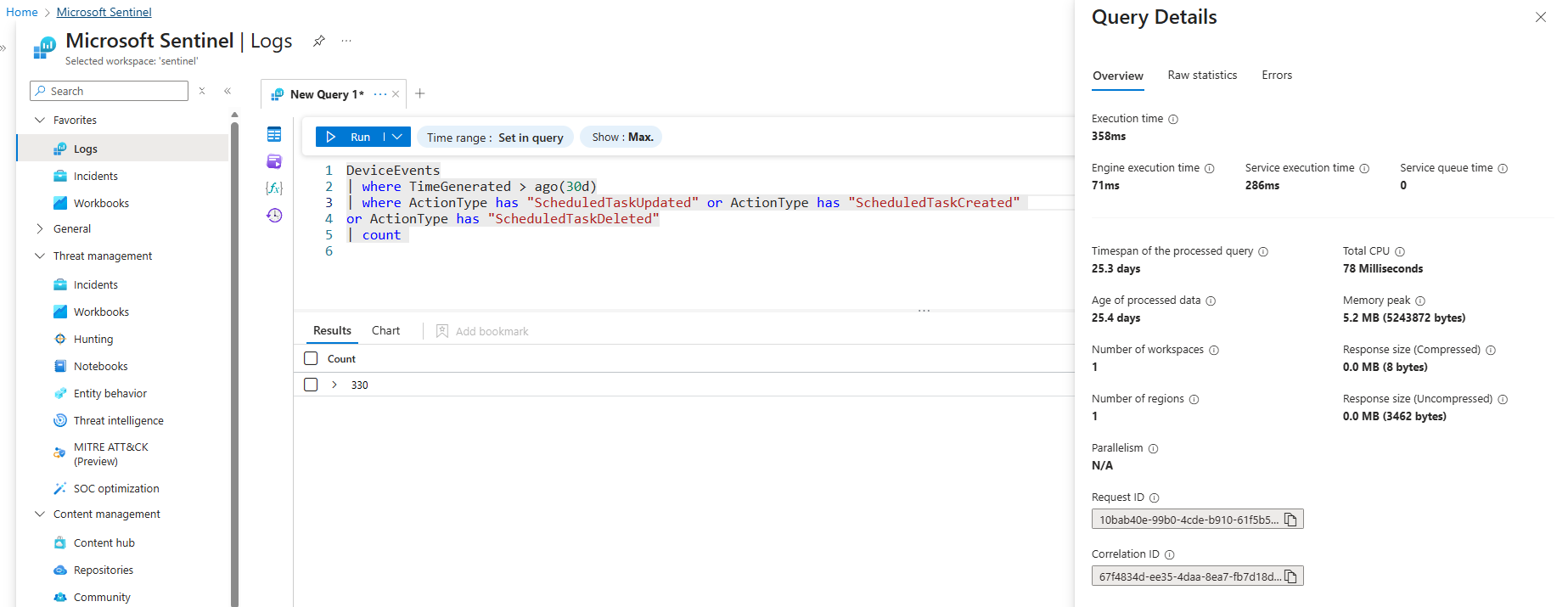
DeviceEvents
| where ActionType has "ScheduledTaskUpdated" or ActionType has "ScheduledTaskCreated"
or ActionType has "ScheduledTaskDeleted"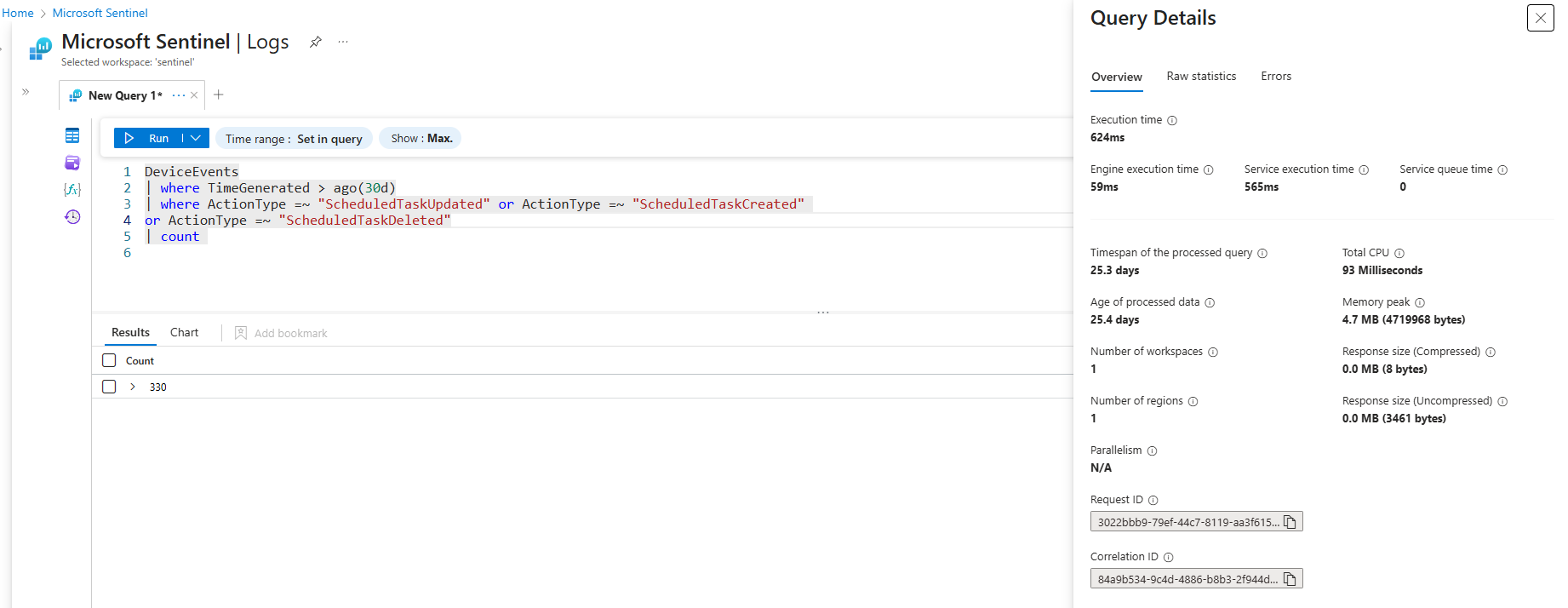
DeviceEvents
| where ActionType in~ ("ScheduledTaskUpdated","ScheduledTaskCreated","ScheduledTaskDeleted")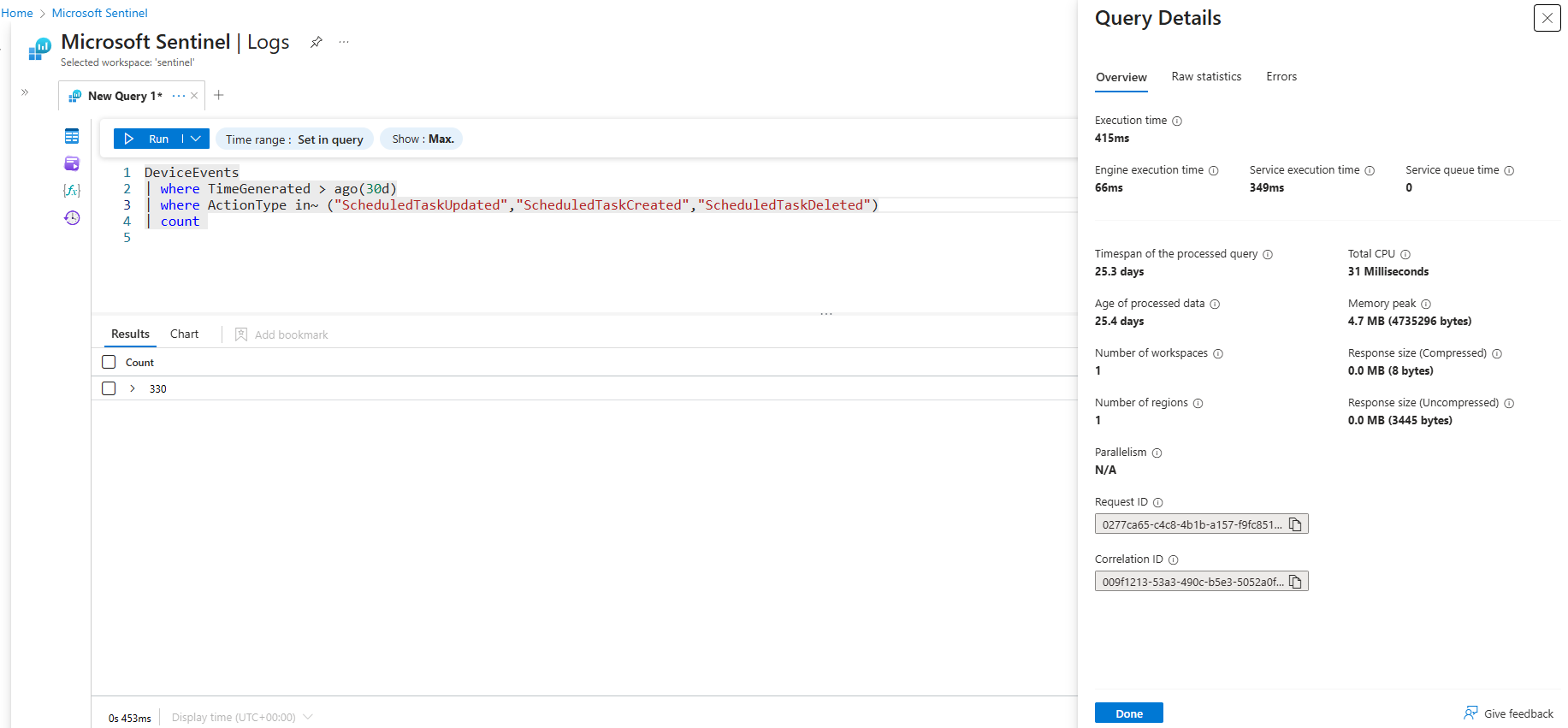
Thus its important to keep a close eye on which functions you use, a very long list with OR/AND statments does not help for performance and readability.
xyz =~ "abc" or def =~ "ghi" or ...Query Resources
The uses resources for queries in Advanced Hunting and Log Analytics Workspace provide visibility into how queries consume resources. In Advanced Hunting, you can access the Query Resource Report, this allows for filtering distinguish between API calls, Custom Detection executions, and portal queries.
In Log Analytics Workspace, similar details are available when you execute a query, click Query Details in the bottom right corner to review execution metrics. LAW resource reports provide a lot more detail in resource usage, if you forward data to Sentinel it is highly recommended to do the resource analysis in LAW.
Build in Functions
To improve performance buildin parsing function can be used, the performance gain (or in some cases loss) of using these functions depends on what you need to extract. The additional advantage of using these functions is that you do not have to build your own parsing mechanism to extract what is needed.
| Function | Use Case |
|---|---|
| parse_path() | Extracts the Scheme, RootPath, DirectoryPath, DirectoryName, Filename and Extension. |
| parse_command_line() | Returns a dynamic arror of commandline arguments. |
| parse_user_agent() | Extracts the Browser (Family, MajorVersion, MinorVersion, Patch), OperatingSystem (Family, MajorVersion, MinorVersion, Patch, PatchMinor), Device (Family, Brand, Model). Note this is build on a regex and if you only need specific fields parsing the json object is more efficient. |
| parse_url() | Extracts the Scheme, Host, Port, Path, Username, Password and Query Parameters. |
Readability
Once the detection’s performance is optimized it is time to make it readable for others. For you as the engineer it is very clear what the detection does, but for the analyst that has to respond to the alerts raised by the detection is should also be clear how the query came to the activities listed in the detection. If the query is more readable these analyst can provide better feedback on detection improvements, rather than saying it triggers on FPs they can point at places in the query where they assume the error is.
Naming convention
Naming conventions are important to many of the things we do in IT, we want to easily recognize certain things. The naming convention is important on multiple levels of the detection.
Starting off in the query logic itself, in this code we can define our own functions and variables. You want to keep those names consistent as it improves readability and ease of maintenance.
These variables do not only need to be consistend in one query, they need to be consistend across all your queries. For example we have a variable for a time window in which we want our query to apply to, TimeSearch, TimeFrame, timeframe, time, t are all variables I have come across. It is best to select one and use that in all queries. If you ever need to review such a variable you can do a search across all queries at return the affected queries in one go.
When working with cross border teams make sure that a single lanaguage is used across your naming convention, using different languages leads to people not understanding the variables and not being inclusive.
Use variables
Variables are assigned using the let statement in KQL. Variables are both a best practice for readability as well as for maintainability. Before we dive into why you should use them have a look at the two detections below, the logic is the same only one uses let variables.
let MailBoxSyncOperations = CloudAppEvents
| where ActionType == "MailItemsAccessed"
| extend MailAccessType = toint(RawEventData.RecordType), IsThrottled = tostring(parse_json(RawEventData.OperationCount))
| where MailAccessType == 2
// Parse synchronised folders. All FolderNames should be considered compromised.
| extend ParentFolder = parse_json(RawEventData.Item).ParentFolder
| extend SyncedFolder = tostring(ParentFolder.Name), Path = tostring(ParentFolder.Path), MailboxGuid = tostring(parse_json(RawEventData.MailboxGuid)), UserId = tolower(parse_json(RawEventData.UserId))
| summarize TotalFolers = dcount(SyncedFolder), Folders = make_set(SyncedFolder) by bin(TimeGenerated, 30m), UserId, IPAddress, MailboxGuid;
let LargeSyncOperations = MailBoxSyncOperations
// Filter & enrich results
| where TotalFolers >= array_length(dynamic(["Inbox", "Drafts", "Sent Items", "Archive", "rss", "Inbox", "Deleted Items", "Junk Email"]))
| extend GeoIPInfo = geo_info_from_ip_address(IPAddress)
| extend country = tostring(parse_json(GeoIPInfo).country);
LargeSyncOperations
| join kind=inner (AADSignInEventsBeta | where TimeGenerated > startofday(ago(14d)) and LogonType == '["interactiveUser"]' | project ErrorCode, AccountUpn = tolower(AccountUpn), IPAddress | summarize TotalSuccess = countif(ErrorCode == 0), TotalFailed = countif(ErrorCode != 0) by AccountUpn, IPAddress) on $left.IPAddress == $right.IPAddress, $left.UserId == $right.AccountUpn
// Filter only on IPs with low successrate
| where TotalSuccess <= 10let DefaultInboxFolders = pack_array("Inbox", "Drafts", "Sent Items", "Archive", "rss", "Inbox", "Deleted Items", "Junk Email");
let BinSize = 30m;
let TimeFrame = 14d;
let MaxSuccess = 10;
let MailBoxSyncOperations = CloudAppEvents
| where ActionType == "MailItemsAccessed"
| extend MailAccessType = toint(RawEventData.RecordType), IsThrottled = tostring(parse_json(RawEventData.OperationCount))
| where MailAccessType == 2
// Parse synchronised folders. All FolderNames should be considered compromised.
| extend ParentFolder = parse_json(RawEventData.Item).ParentFolder
| extend SyncedFolder = tostring(ParentFolder.Name), Path = tostring(ParentFolder.Path), MailboxGuid = tostring(parse_json(RawEventData.MailboxGuid)), UserId = tolower(parse_json(RawEventData.UserId))
| summarize TotalFolers = dcount(SyncedFolder), Folders = make_set(SyncedFolder) by bin(TimeGenerated, BinSize), UserId, IPAddress, MailboxGuid;
let LargeSyncOperations = MailBoxSyncOperations
// Filter & enrich results
| where TotalFolers >= array_length(DefaultInboxFolders)
| extend GeoIPInfo = geo_info_from_ip_address(IPAddress)
| extend country = tostring(parse_json(GeoIPInfo).country);
LargeSyncOperations
| join kind=inner (AADSignInEventsBeta | where TimeGenerated > startofday(ago(TimeFrame)) and LogonType == '["interactiveUser"]'
| project ErrorCode, AccountUpn = tolower(AccountUpn), IPAddress | summarize TotalSuccess = countif(ErrorCode == 0), TotalFailed = countif(ErrorCode != 0) by AccountUpn, IPAddress) on $left.IPAddress == $right.IPAddress, $left.UserId == $right.AccountUpn
// Filter only on IPs with low successrate
| where TotalSuccess <= MaxSuccessBig Yellow Taxi 🚕 - The Big Yellow Taxi detections are based on the compromise of the state department in 2023. The following information was shared: State Department was the first victim to discover the intrusion when, on June 15, 2023, State’s security operations center (SOC) detected anomalies in access to its mail systems. The next day, State observed multiple security alerts from a custom rule it had created, known internally as “Big Yellow Taxi,” that analyzes data from a log known as MailItemsAccessed, which tracks access to Microsoft Exchange Online mailboxes. The query with comments is available on GitHub
Using variables has significant advantages:
- Improved readability: Due to the clear variable names and the fact that you do not need to search the whole query it becomes a lot easier to grabs what a detection does at first glance. Additionally, using variables prevents long arrays or static lists from cluttering the query logic. For example, maintaining a list of LOLBins in a variable is far more readable than in a filter in directly in the query.
- Reusability and maintainability: Reusable code, as changing the variable will change all the occurrences of the variable in the code. Functions can be saved for everyone in de tenant to use, in which the logic is saved centrally and from a query only the function is called instead of copying the code.
- Performance: Keep variable tables using the
materializeexpression in memory, this improves performance. - Parameterization: The initial variables set in the Big Yellow Taxi 🚕 example with
letvariables has clear parameters DefaultInboxFolders, BinSize, TimeFrame and MaxSuccess give direct context of the parameters used to filter. Additionally these variables make it easier to adjust query paremeters.
Project results
The last part of the readability section is not about the query itself, it is about interpreting results. At the end of each query the results are displayed using one of the project operators. My personal best practice is to not use protect at the end of custom detections, instead use project-reoder parameter to reorder the results by listing the most significant columns first and keeping all the raw logs for the analysts and incident responders to review. When using project the results are only limited to the columns that are included, for the detection thay may be enough, analysts need to get as much context as possible to analyse their incident. Especially the AdditionalFields or RawEventData columns can be a goldmine from an response perspective.
Context is key
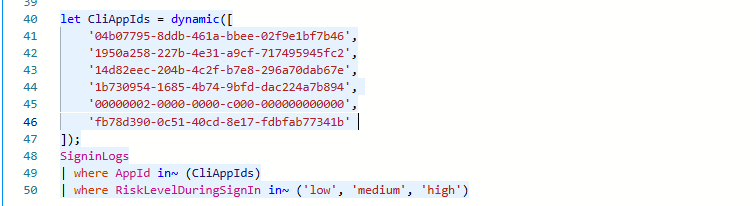
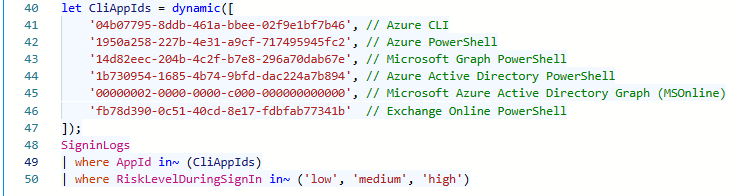
Comments are needed to provide context, this is explained using a query that lists risky sign-in (attempts) to CLI Applications. The detection is based on a list of Application Ids, which is prefered to filter on Id instead of the application name. In the first example no context is provided, nobody knows all AppIds by heart, thus you have to lookup all Ids to be able to understand this filter, not really effective right? The second exmple is how it should be done, provide clear context of what each Id relates to. This allows other detection engineers to easily understand what it detects and helps analyst understand the scope of the detection. For user SigninLogs the AppId is also a column, but if the detection was for example the AADServicePrincipalSignInLogs table does not store the name.
Maintenance
The maintenance has a significant overlap with the readability of the query, the better the detection is to read the easier the query is to update. A whole new blog series can be drafted only on the best practices of detection maintenance, in this blog we primarily focus on maintaining the white-/blacklists that serve as filterin mechanism for the logic.
Add comments to whitelist or exclusions
When implementing whitelisting in detections, clear and meaningful comments are needed. If you exclude something from the results, a year from now, it is very likely that you no longer remember why a specific filter was added to a detection. Every whitelist entry should therefore include context that explains why it was introduced, what it is intended to exclude, and who added it. This information can either be added directly into the query logic, or should be saved in the CI/CD repository that is the source for your detections. Defining whitelists as variables improves readability and maintainability, but there are cases where filtering or exclusions must be applied inline. Even in those situations, comments should always be added to document the reasoning behind the whitelist. The examples below show how you can provide context on what, why and who whitelisted an file.


Certificate based whitelisting is prefered whenever possible over hashes or filenames. Hashes are difficult to manage because they change with every software update, and filename based whitelisting can introduce detection gaps, as filenames are easily abused for defense evasion. The
DeviceFileCertificateInfotable contains information certificate information of signed files obtained from certificate verification events on onboarded devices.
GlobalWhitelist
Conclusion
Yes providing more information requires more effort, but the investment is worth it