Defender for Endpoint Timeline Internals
After the publication of the timeline-downloader tool by Matthieu Gras it was time to test the solution to identify the value for DFIR and explore the internals of the timeline logs. After a quick initial , I already concluded that this tool changes the game for timeline based investigations, not only is the tool well designed for multihost timeline acquisition it also makes the raw telemetry of the timeline more accessible, resulting in much more insights for DFIR and Security Research folks. This blog will research the timeline events that benefit IR investigations. The investigation of the logs is done in two approaches:
- Exporting the results of the logs to Data Explorer for KQL based analysis.
- Commandline filtering of the logs.
📘 Before reading this blog, make sure to check out the Defender Timeline Downloader: Extending Data Retention for Incident Response from Matthieu Gras. This blog covers the context and architecture of the tool.
🔨 The tool itself is available on GitHub and explains how to run the tool: https://github.com/matthieugras/timeline-downloader
⚠️ The data used in this investigation is not complete, there are more events that are not covered as they did not appear in my test environment.
Acquiring Defender for Endpoint Timeline Data
To evaluate the coverage and depth of Defender for Endpoint’s timeline telemetry, the timeline-downloader tool was executed targeting four hosts simultaneously. Workstation-03 is the most active host with around 600.000 exported events. In total 1310000 events had been exported in 16 minutes, which is a game changer compared to manual analysis (and the huge struggle) of the timeline. In total the output files of the four assets take up 3,4 GB of data. The acquisition was performed using the default configuration of five workers. Increasing the worker count or setting the timechunk parameter would further speed up the download and thus reduce the acquisition time.
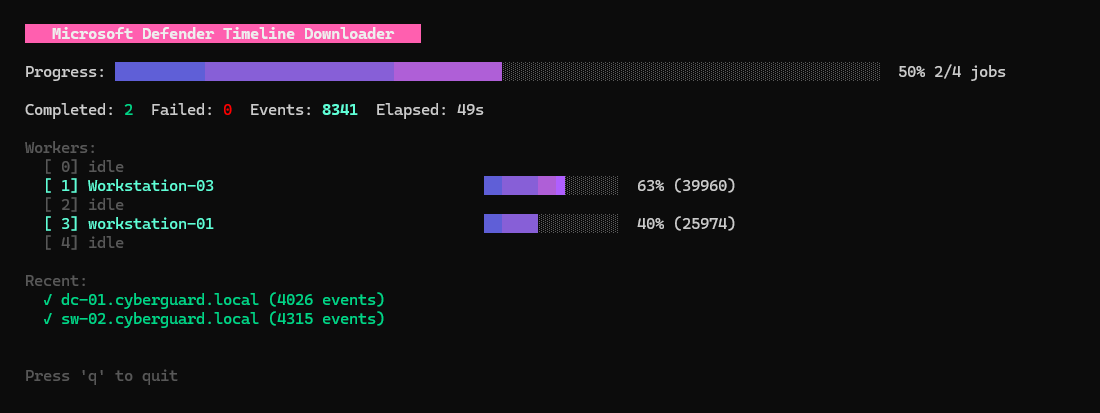
bert-jan@DESKTOP-J0PG8P6:~/timeline-downloader$ ls -lh output/
total 3.4G
-rw-r--r-- 1 bert-jan bert-jan 1.6G Jan 22 19:36 Workstation-03_2694a7cc2225f3b66f7cf8b6388a78b1857fadca_timeline.jsonl
-rw-r--r-- 1 bert-jan bert-jan 354M Jan 22 19:25 dc-01.cyberguard.local_84fe39795cd8c40251afa9066d33451824189f82_timeline.jsonl
-rw-r--r-- 1 bert-jan bert-jan 275M Jan 22 19:24 sw-02.cyberguard.local_95c0eba6b7443d0966afbb9a2c5dfcca6b3d719c_timeline.jsonl
-rw-r--r-- 1 bert-jan bert-jan 1.3G Jan 22 19:37 workstation-01_d570c4018bf303ce65256dfa7cea8ecf0e802d18_timeline.jsonl
The exported JSONL files can be ingested into Azure Data Explorer (ADX) for KQL based analysis and storage. In the blog Incident Response Part 2: What about the other logs? it explains how you can ingest the data into Azure Data Explorer. In this research, all timeline events were ingested into a table named TimelineDownloader. Adjust the KQL examples in later sections if your table name differs.
💡Tip - Microsoft offers a free 100GB Data Explorer cluster to play with. This is great for such side projects and to train your skills.
Reviewing the Timeline Dataset
Once the data is downloaded to your machine or uploaded to ADX, the investigation can kick off. To get an idea of what is included in the data, we first dump the schema of the created table. This displays a couple of interesting columns that require more in depth analysis:
IsCyberDataActionTypeSourceProviderMitreInfoCyberActionType
The full schema is returned below.
| ColumnName | ColumnOrdinal | DataType | ColumnType |
|---|---|---|---|
| IsCyberData | 0 | System.SByte | bool |
| ActionTime | 1 | System.DateTime | datetime |
| ActionTimeIsoString | 2 | System.DateTime | datetime |
| ActionType | 3 | System.String | string |
| Machine | 4 | System.Object | dynamic |
| Registry | 5 | System.Object | dynamic |
| InitiatingProcess | 6 | System. Object | dynamic |
| InitiatingProcessParent | 7 | System.Object | dynamic |
| InitiatingUser | 8 | System.Object | dynamic |
| LogonType | 9 | System.String | string |
| AppGuardContainerId | 10 | System.String | string |
| Tags | 11 | System.Object | dynamic |
| ReportId | 12 | System.String | string |
| MergedItemsReportIds | 13 | System.Object | dynamic |
| MergedItemsReportIdsToTimes | 14 | System.Object | dynamic |
| SourceProvider | 15 | System.String | string |
| Entities | 16 | System.Object | dynamic |
| MitreInfo | 17 | System.Object | dynamic |
| IsBoldEvent | 18 | System.SByte | bool |
| TypedDetails | 19 | System.Object | dynamic |
| HiddenDetails | 20 | System.Object | dynamic |
| PreviousRegistry | 21 | System. Object | dynamic |
| Process | 22 | System.Object | dynamic |
| AdditionalFields | 23 | System.Object | dynamic |
| User | 24 | System.Object | dynamic |
| AlertIds | 25 | System.Object | dynamic |
| CyberActionType | 26 | System.Object | dynamic |
| Description | 27 | System.String | string |
| Icon | 28 | System.String | string |
| RelatedObservationName | 29 | System.String | string |
| File | 30 | System.Object | dynamic |
| RemoteEndpoint | 31 | System.Object | dynamic |
| LocalEndpoint | 32 | System.Object | dynamic |
Commandline based analysis
Commandline based analysis:
cat output/workstation-01_d570c4018bf303ce65256dfa7cea8ecf0e802d18_timeline.jsonl | jq 'keys' | sort -uKusto based analysis:
TimelineDownloader
| getschema
Columns of Interest
During the schema review, several columns stood out for understanding how Defender for Endpoint classifies and stores its timeline telemetry. This section discusses the purpose of each of these columns.
IsCyberData
The IsCyberData column has two values: true or false. All ‘regular’ events have the boolean value set to false, only the ActionType OneCyber has this value set to true. This split between ’normal’ and IsCyberData seems to be that ’normal’ data is made available in Advanced Hunting, as the ActionTypes in the set are known actions.

Commandline based analysis
cat output/workstation-01_d570c4018bf303ce65256dfa7cea8ecf0e802d18_timeline.jsonl | jq -s -r 'group_by(.IsCyberData) |
          map([
            (.[0].IsCyberData | tostring),
            (map(.ActionType) | unique | join(";"))
          ] | @csv)[]'
Kusto based analysis:
TimelineDownloader
| summarize make_set(ActionType) by IsCyberData
Investigating the ActionType Column
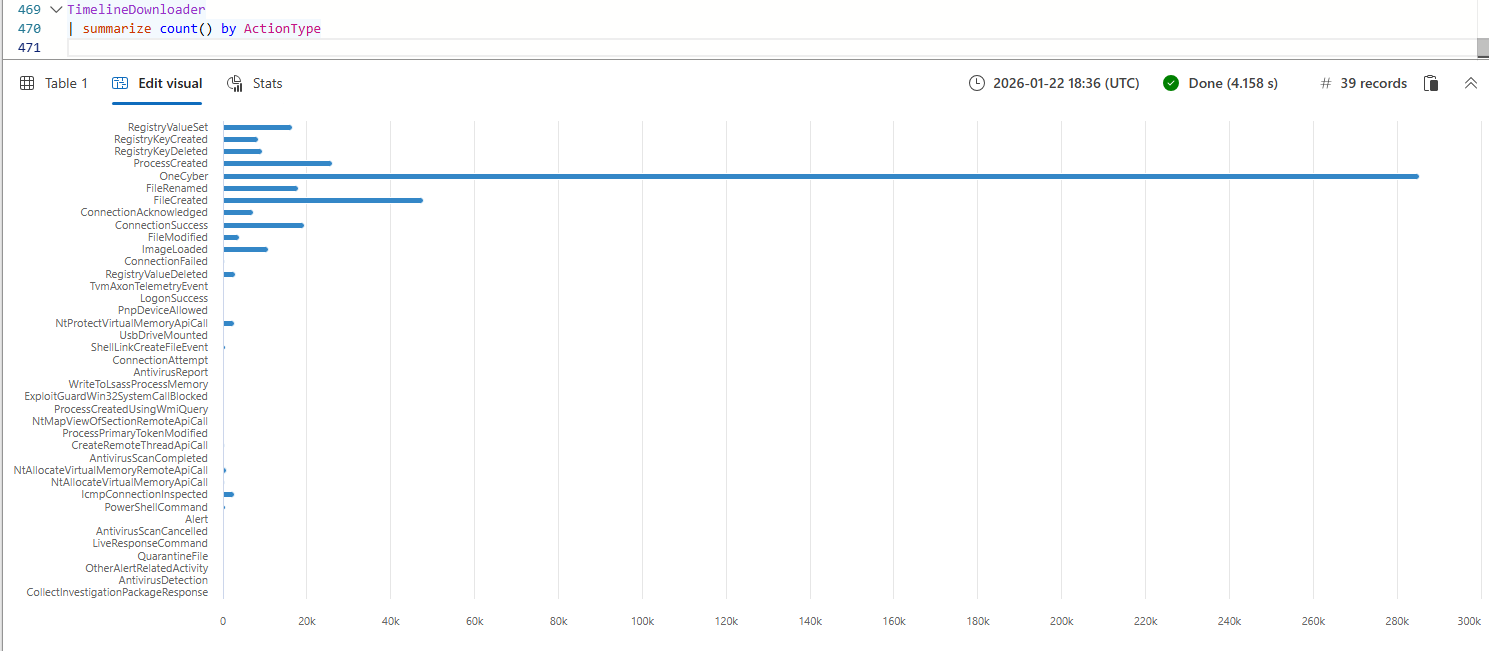
The data in the json export has the familiar ActionType field which Defender For Endpoint uses to group events into EventTypes. When analysing the output of the ActionType column we can observe the following:
- Most of the actions found in this field are already known to us, they streamed to one of the Device* tables that Defender For Endpoint logs in Advanced Hunting.
- The timeline also contains Action Center events of activities that have been performed on the device. Examples of these activities are for example QuarantineFile, CollectInvestigationPackageResponse and LiveResponseCommand.
- The majority of the events are in the
OneCybercategory, which is certainly not a dissapointment, this field is rich with content that we do not natively have in the Advanced Hunting logs, more on that later.
Commandline based analysis
cat output/workstation-01_d570c4018bf303ce65256dfa7cea8ecf0e802d18_timeline.jsonl | jq -r '.ActionType' | sort | uniq -cKusto based analysis:
TimelineDownloader
| summarize count() by ActionType
SourceProvider
The SourceProvider column has three values, which seems to be the source product that streams the data to the timeline. In the exported dataset, three distinct values appear:
- MDE - events originating from Microsoft Defender for Endpoint
- MDI - based on the name suggests events attributed to Microsoft Defender for Identity
- Empty values - alert related events
The interesting part is that MDI only seems to cover the OneCyber actions. As mentioned later in the blog, the MDI does include lots of OS based logs, which are not related to Defender For Identity. This makes me question if the MDI abbrivitation is refering to the MDI product of to a full name that we are not aware of (yet).

MITRE Mapping and Coverage Analysis
The MitreInfo column lists the related MITRE ATT&CK tactics and techniques for the OneCyber events. This is purely speculation, based on the information we got from the previous step thing start to make sense (sort of). An event is IsCyberData when there is a MITRE ATT&CK technique mapped. In the dataset used there is no OneCyber event without mapping to any MITRE ATT&CK tactic of technique.
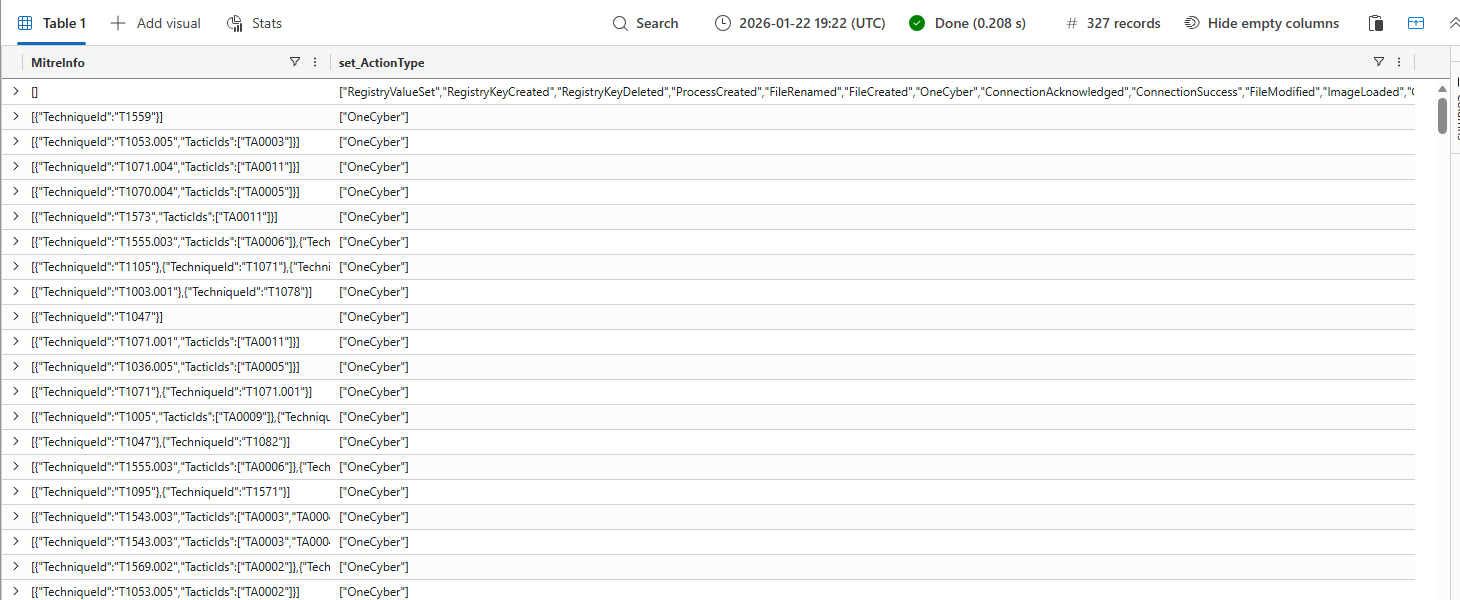
The MitreInfo events can be converted into a MITRE layer to determine the coverage of the OneCyber events. The .json of the MITRE layer is available on GitHub. The layer is based on Windows techniques as that is the only OS used in the exported devices.
There is coverage available all over the board, with Discovery seemingly being the tactic that has the move coverage. With this export, the DFIR coverage becomes actionable to defenders and their response strategy.
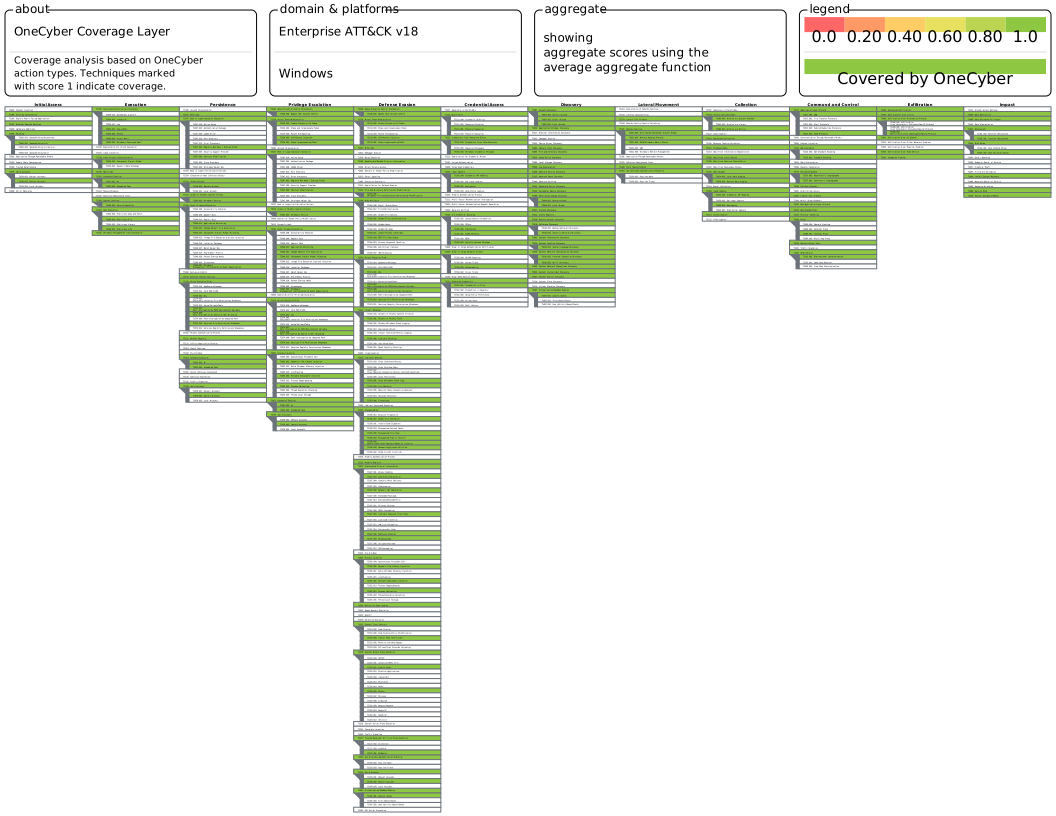
MITRE ATT&CK Coverage Visualization
CyberActionType
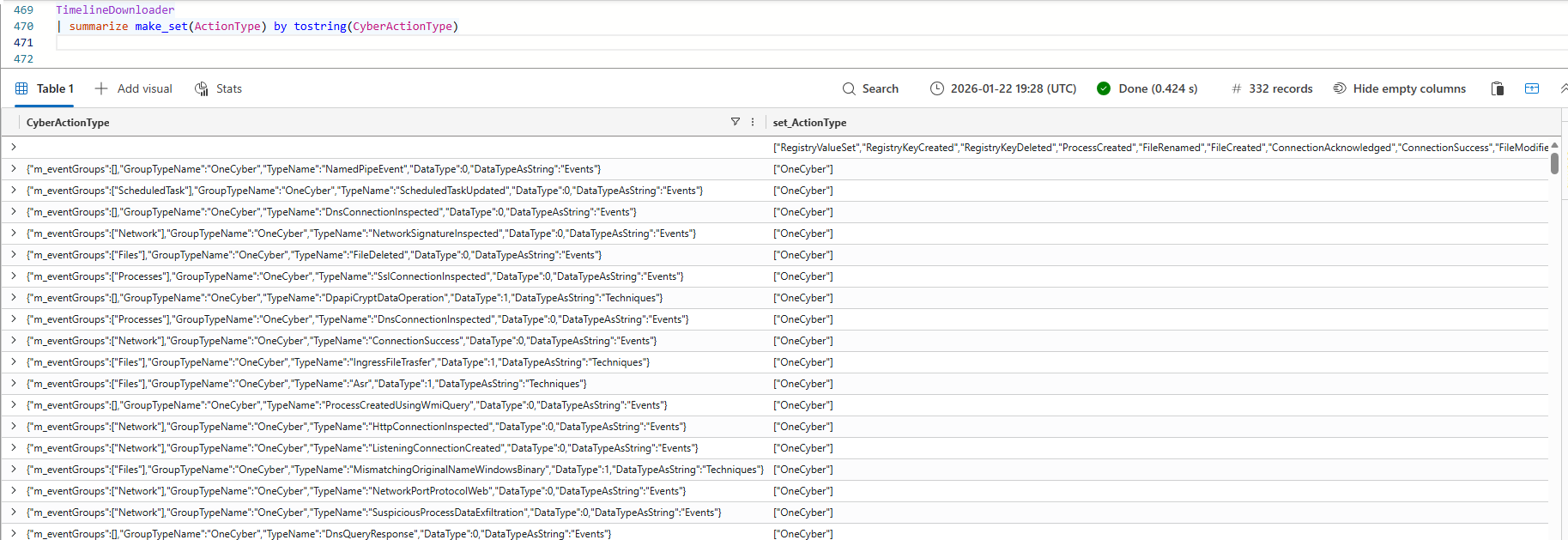
The last event on our list of columns of interest is the CyberActionType column. Again the OneCyber event is dividing the events. If the event is a OneCyber event there is data in the column. At first glance, this data looks promising as it seems to be seperated by different TypeName fields that seem similar to the ActionTypes but also contain different fields. As example the SuspiciousProcessDataExfiltration TypeName is not something that is logged in Advanced Hunting but sounds interesting from a DFIR perspective.
Investigating the OneCyber events
The OneCyber events are not new, in the Microsoft Defender for Endpoint Internals 0x04 — Timeline telemetry, Olaf compares this field already with the exsisting events available in Advanced Hunting.
The OneCyber event data has a column named RelatedObservationName, the content of this column feels similar to the ActionType column, it has events such as NamedPipeCreation, ListeningSocketCreated, MismatchingOriginalNameWindowsBinary, AmsiContentDetails, AmsiContent, BeaconingActivity and WindowsLocalGroupMemberEnumeration. I have uploaded the export with unique matches between the TypeName and RelatedObservationName columns to GitHub, in total 279 combinations were made.
Commandline based analysis
cat output/workstation-01_d570c4018bf303ce65256dfa7cea8ecf0e802d18_timeline.jsonl | jq -s 'map(select(.ActionType == "OneCyber") |
       {
         TypeName: (.CyberActionType.TypeName // "" | tostring),
         RelatedObservationName: .RelatedObservationName,
         ActionType: .ActionType
       }) |
       unique |
       sort_by(.TypeName, .RelatedObservationName)'
Kusto based analysis:
TimelineDownloader
| where ActionType == "OneCyber"
| extend TypeName = tostring(CyberActionType.TypeName)
| distinct  TypeName, RelatedObservationName, ActionType
| sort by TypeName, RelatedObservationName
Mapping Timeline Fields to Log Fields
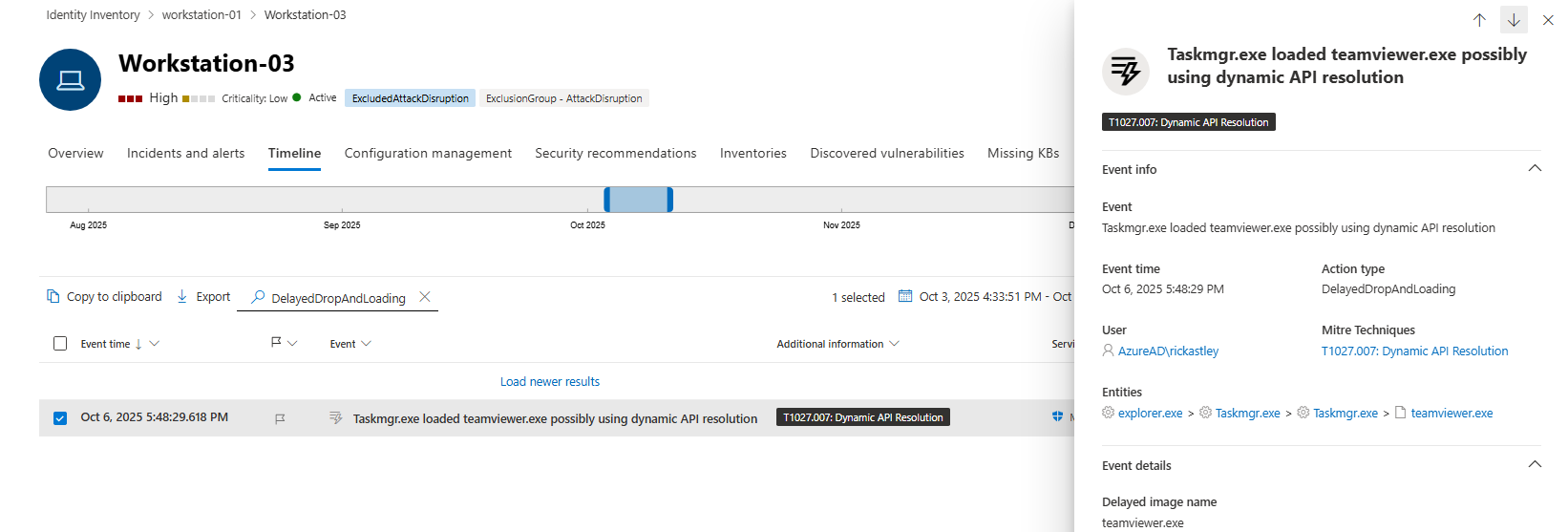
Now that we understand the structure of the exported timeline logs, we can start correlating them with what appears in the Defender for Endpoint timeline in the portal. Several internal fields from the JSON export map directly to elements shown in the timeline interface, while others provide additional context that is not natively available in the portal without enabling developer mode. The MitreInfo maps to the additional information column of the timeline. If the timeline field has a MITRE mapping it is considered IsCyberData. The TypeName field translates to the Action type. The Description column in the JSON translates to the Event field in the gui.
DFIR Opportunities
With a solid understanding of how the timeline data is obtained, formatted and enriched we can shift focus. The reason we obtain the data is to answer the questions we have, we need to find out what happened on a host. Based on this data we want to know in what areas this data can add value to DFIR investigations. This section describes multiple areas in which these exports can add value to your investigations.
This section will discuss multiple TypeNames that can be of interest for incident response investigations. The bash script or Kusto query below can be used in all of these steps by changing the value of the TypeName in the filter. If additional parsing is needed an adjusted query is added for more context. The details of the action are saved in the TypedDetails column as JSON object.
It is important to mention that all these TypeNames are already available on the timeline, the logs did not provide new data. The main difference is that exporting all logs for 180 days provides a scalable way to analyze the actions and identify relevant actions based on alert or hunt for anomalies on the full timeline.
Commandline based analysis
cat output/workstation-01_d570c4018bf303ce65256dfa7cea8ecf0e802d18_timeline.jsonl | jq 'select(.ActionType == "OneCyber") |
    select(.CyberActionType.TypeName == "PsTokenDebugPrivilegeAdditionDropAndExec")'
Kusto based analysis:
TimelineDownloader
| where ActionType == "OneCyber"
| extend TypeName = tostring(CyberActionType.TypeName)
| where TypeName == "PsTokenDebugPrivilegeAdditionDropAndExec"
AMSI Content
First off are the AMSI related events. With the introduction of custom data collection in Microsoft Defender for Endpoint we have the opportunity to collect AMSI events from EDR onboarded devices. In the timeline export several AMSI related events are included:
AmsiScriptDetectionAmsiContentPatternAmsiContentDetailsAmsiContent
These four events give details on what patterns, detections and content passed through AMSI. To review the details you would need to filter on any of the four AMSI events, for example the AmsiContent TypeName. The data describes what and who initiated the activity and the content of the executed commands. The Hello.exe executable was a SliverC2 beacon that executed the activities.
"TypedDetails": [
	{
		"key": "Content",
		"value": ".\\Hello.exe ping 8.8.8.8",
		"valueType": "String",
		"isHidden": false
	},
	{
		"key": "Content sha256",
		"value": "d303768785321558d04aac3249110fc33af31861628e2db410123bbe5d3ba933",
		"valueType": "CopyPastableString",
		"isHidden": false
	}
]
...
"TypedDetails": [
	{
		"key": "Content",
		"value": "schtasks /create /tn \"EDRTest\" /tr \"calc.exe\" /sc minute /mo 5",
		"valueType": "CopyPastableString",
		"isHidden": false
	},
	{
		"key": "Content sha256",
		"value": "5a2b66749d8900c1d4d1903efd683939fd7edaa061b9e98e2ee3ade2d58b13a0",
		"valueType": "CopyPastableString",
		"isHidden": false
	}
],
DelayedDropAndLoading
The events related to the TypeName DelayedDropAndLoading would require more research in what these events exactly are. Without context they may not seem too interesting, however the fact is that both the teamsviewer.exe and JetBrains.exe are being Sliver C2 beacons. Adding to this that these are the only events out of 1.3 million that have this specific TypeName it could yield forensic value.

JavaScript & MSHTA
The timeline events contain more granular events related to script execution, as example JavaScript and MSHTA have their own category. In case a malicious MSHTA file is executed, these logs can provide details on what the contents of the malious file executed.
"TypedDetails": [
	{
		"key": "Script interpreter image file",
		"value": "mshta.exe",
		"valueType": "CyberEntity",
		"isHidden": false,
		"entityId": "b6cbda321330383c8e91df69a8ceae0b771af8ce",
		"entityType": "file"
	},
	{
		"key": "Script interpreter image file path",
		"value": "C:\\Windows\\System32\\mshta.exe",
		"valueType": "CopyPastableString",
		"isHidden": false
	},
	{
		"key": "Script interpreter pid",
		"value": "11272",
		"valueType": "String",
		"isHidden": false
	},
	{
		"key": "Script interpreter command line",
		"value": "\"mshta.exe\" javascript:eval('wscript.shell.Run(\\ calc.exe\\)')",
		"valueType": "CopyPastableString",
		"isHidden": false
	},
	{
		"key": "Script interpreter remote session initiator IP",
		"value": "192.168.178.144",
		"valueType": "CyberEntity",
		"isHidden": false,
		"entityId": "192.168.178.144",
		"entityType": "ip"
	},
	{
		"key": "Script interpreter remote session initiator device name",
		"value": "WORKSTATION-03",
		"valueType": "String",
		"isHidden": false
	}
],
RemoteAccessSoftware
The last event that I want to highlight is RemoteAccessSoftware, which is a common initial access vector (T1133). This event type highlights the presence or execution of remote access tools (RATs) on a device.
In the exported dataset, multiple events were detected for AnyDesk and TeamViewer, clearly identifying:
- The binary filename
- The installation or execution path
"TypedDetails": [
	{
		"key": "Remote access tool file",
		"value": "teamviewer.exe",
		"valueType": "CyberEntity",
		"isHidden": false,
		"entityId": "87bafe9379dc27234197946a535baa45322967e2",
		"entityType": "file"
	},
	{
		"key": "Remote access tool file path",
		"value": "C:\\Users\\RickAstley\\OneDrive - KQLQuery.com\\Pictures\\teamviewer.exe",
		"valueType": "CopyPastableString",
		"isHidden": false
	},
	{
		"key": "Remote access tool",
		"value": "TeamViewer",
		"valueType": "String",
		"isHidden": false
	}
],
There are way more events that provide valuable insights into what happend on the host of interest, these were just a couple of examples to show the granularity of the data. All this data is available in the GUI timeline, but requires setting the right timeframes to find it.
Timeline vs. Advanced Hunting
The last thing I wanted to do before concluding the research was to identify the difference between the data available in Advanced Hunting and the data that is present in the timeline. As responders we all know that there are differences, but there is limited clarity on when to use one of the two.
The comparison is based on three different inputs:
- All ActionTypes from the Device* tables in Advanced Hunting
- All ActionTypes from the timeline logs
- All parsed TypeNames from the timeline logs
The ActionType can be any of the three sources; ActionType Advanced Hunting, ActionType Timeline or TypeName timeline event.
⚠️ The comparison made below is binary. In practice many of the actions are also logged in Advanced Hunting but with a different name or withing other aggregated events, however in most cases the data is not already split into categories for easy filtering.
| ActionType | TableName | AvailableInTimeLine | AvailableInAdvancedHunting |
|---|---|---|---|
| Alert | ✅ | ❌ | |
| AlternateDataStreamModification | ✅ | ❌ | |
| AmsiContent | ✅ | ❌ | |
| AmsiContentDetails | ✅ | ❌ | |
| AmsiContentPattern | ✅ | ❌ | |
| AmsiScriptContent | DeviceCustomScriptEvents | ❌ | ✅ |
| AmsiScriptDetection | DeviceEvents | ✅ | ✅ |
| AnomalousAsepByRegistry | ✅ | ❌ | |
| AnomalousKeyboardHook | ✅ | ❌ | |
| AnomalousSetWindowsHookEx | ✅ | ❌ | |
| AntivirusDetection | DeviceEvents | ✅ | ✅ |
| AntivirusDetectionActionType | ✅ | ❌ | |
| AntivirusReport | DeviceEvents | ✅ | ✅ |
| AntivirusScanCancelled | DeviceEvents | ✅ | ✅ |
| AntivirusScanCompleted | DeviceEvents | ✅ | ✅ |
| AppControlCodeIntegritySigningInformation | DeviceEvents | ✅ | ✅ |
| AsepByRegistry | ✅ | ❌ | |
| AsepByRegistryModification | ✅ | ❌ | |
| Asr | DeviceEvents | ✅ | ✅ |
| AsrAbusedSystemToolAudited | DeviceEvents | ✅ | ✅ |
| AsrLsassCredentialTheftAudited | DeviceEvents | ❌ | ✅ |
| AsrPersistenceThroughWmiAudited | DeviceEvents | ❌ | ✅ |
| AsrPsexecWmiChildProcessAudited | DeviceEvents | ❌ | ✅ |
| AuditPolicyModification | DeviceEvents | ✅ | ✅ |
| AutomatedCollectionByStaging | ✅ | ❌ | |
| Base64EncodedCommandLine | ✅ | ❌ | |
| BeaconingActivity | ✅ | ❌ | |
| BitBltEvent | ✅ | ❌ | |
| BitsJobAddFiles | ✅ | ❌ | |
| BitsJobCancel | ✅ | ❌ | |
| BitsJobCreate | ✅ | ❌ | |
| BitsJobsSuspiciousFileDownload | ✅ | ❌ | |
| BootRecordChange | ✅ | ❌ | |
| BrowserCreatedMalware | ✅ | ❌ | |
| BrowserLaunchedToOpenUrl | DeviceEvents | ✅ | ✅ |
| ClipboardGetData | ✅ | ❌ | |
| ClrModuleLoad | ✅ | ❌ | |
| ClrUnbackedModuleLoaded | DeviceEvents | ✅ | ✅ |
| CmdExecution | ✅ | ❌ | |
| CollectInvestigationPackageResponse | ✅ | ❌ | |
| ComClassRegistration | ✅ | ❌ | |
| CommonFileNameDropSignerMismatch | ✅ | ❌ | |
| CommonToolRenamed | ✅ | ❌ | |
| CompressedFileModify | ✅ | ❌ | |
| CompressedFileNetworkConnection | ✅ | ❌ | |
| ConnectionAcknowledged | DeviceNetworkEvents | ✅ | ✅ |
| ConnectionAttempt | DeviceNetworkEvents | ✅ | ✅ |
| ConnectionFailed | DeviceNetworkEvents | ✅ | ✅ |
| ConnectionFailedAggregatedReport | DeviceNetworkEvents | ✅ | ✅ |
| ConnectionSuccess | DeviceNetworkEvents | ✅ | ✅ |
| ConnectionSuccessAggregatedReport | DeviceNetworkEvents | ✅ | ✅ |
| ContainedUserRemoteDesktopSessionDisconnected | DeviceEvents | ✅ | ✅ |
| ContainedUserRemoteDesktopSessionStopped | DeviceEvents | ✅ | ✅ |
| ControlFlowGuardViolation | ✅ | ❌ | |
| CreateProcessAsUser | ✅ | ❌ | |
| CreateProcessThroughWMIAPI | ✅ | ❌ | |
| CreateRemoteThreadApiCall | DeviceEvents | ✅ | ✅ |
| CreateWindowsDomainAccount | ✅ | ❌ | |
| DataTransferSizeLimitsOverTCP | ✅ | ❌ | |
| DcomRemoteComponentInvocation | ✅ | ❌ | |
| DefenderObfuscation | ✅ | ❌ | |
| DelayedDropAndLoading | ✅ | ❌ | |
| DelayedNdrZeekExfiltration | ✅ | ❌ | |
| DelayedTcpNetworkBytesTransfer | ✅ | ❌ | |
| DeviceShutdown | ✅ | ❌ | |
| DirectoryServiceObjectCreated | ✅ | ❌ | |
| DirectoryServiceObjectModified | ✅ | ❌ | |
| DlpFileInformationNetworkConnection | ✅ | ❌ | |
| DnsConnectionInspected | DeviceNetworkEvents | ✅ | ✅ |
| DnsQueryResponse | DeviceEvents | ✅ | ✅ |
| DomainGroupSamrQuery | ✅ | ❌ | |
| DomainSamrQuery | ✅ | ❌ | |
| DpapiAccessed | DeviceEvents | ❌ | ✅ |
| DpapiCryptDataOperation | ✅ | ❌ | |
| DriverLoad | DeviceEvents | ✅ | ✅ |
| EnumerateDomainTrusts | ✅ | ❌ | |
| EventLogWasCleared | ✅ | ❌ | |
| ExecutionFromRegistryRunKeys | ✅ | ❌ | |
| ExploitGuardChildProcessAudited | DeviceEvents | ✅ | ✅ |
| ExploitGuardNonMicrosoftSignedBlocked | DeviceEvents | ✅ | ✅ |
| ExploitGuardWin32SystemCallBlocked | DeviceEvents | ✅ | ✅ |
| ExploratoryCommand | ✅ | ❌ | |
| ExploratoryCommandByCommandLine | ✅ | ❌ | |
| ExploratoryLdapQuery | ✅ | ❌ | |
| FileActionRemoteComponentInvocation | ✅ | ❌ | |
| FileArchiveUtilityUsed | ✅ | ❌ | |
| FileContentOverwrite | ✅ | ❌ | |
| FileCouldBePacked | ✅ | ❌ | |
| FileCreated | DeviceFileEvents | ✅ | ✅ |
| FileCreated | DeviceCustomFileEvents | ✅ | ✅ |
| FileCreatedAggregatedReport | DeviceFileEvents | ✅ | ✅ |
| FileCreatedByRemoteMachine | ✅ | ❌ | |
| FileDaclChange | ✅ | ❌ | |
| FileDeleted | DeviceFileEvents | ✅ | ✅ |
| FileDeletionActivityWasObserved | ✅ | ❌ | |
| FileDownloadedFromInternet | ✅ | ❌ | |
| FileDroppedExecutedThenDeleted | ✅ | ❌ | |
| FileDroppingAfterHighValueFileRead | ✅ | ❌ | |
| FileHasDoubleExtension | ✅ | ❌ | |
| FileHasMotwInternet | ✅ | ❌ | |
| FileModified | DeviceFileEvents | ✅ | ✅ |
| FileModifiedAggregatedReport | DeviceFileEvents | ✅ | ✅ |
| FileRenameAggregatedByExtension | ✅ | ❌ | |
| FileRenameAggregatedByProcess | ✅ | ❌ | |
| FileRenamed | DeviceFileEvents | ✅ | ✅ |
| FileRenamedAggregatedReport | DeviceFileEvents | ✅ | ✅ |
| FileTimeStomp | ✅ | ❌ | |
| FileTypeAssociationSet | ✅ | ❌ | |
| FilesExfiltrationOverNetwork | ✅ | ❌ | |
| GetClipboardData | DeviceEvents | ✅ | ✅ |
| GetPublicIpInformationFromWebsite | ✅ | ❌ | |
| HiddenFileCreated | ✅ | ❌ | |
| HighValueFileNetworkConnection | ✅ | ❌ | |
| HighValueFileRead | ✅ | ❌ | |
| HostsFileOpen | ✅ | ❌ | |
| HttpConnectionInspected | DeviceNetworkEvents | ✅ | ✅ |
| HttpDataExfiltration | ✅ | ❌ | |
| IcaclsModifiedEntityPermission | ✅ | ❌ | |
| IcmpConnectionInspected | DeviceNetworkEvents | ✅ | ✅ |
| ImageFileModification | ✅ | ❌ | |
| ImageLoaded | DeviceImageLoadEvents | ✅ | ✅ |
| InBoundHostVerticalPortScan | ✅ | ❌ | |
| InboundConnectionAccepted | DeviceNetworkEvents | ✅ | ✅ |
| InboundRdpConnection | ✅ | ❌ | |
| IndicatorBlockingCommand | ✅ | ❌ | |
| IngressFileTrasfer | ✅ | ❌ | |
| InjectionAndDotNetDllLoading | ✅ | ❌ | |
| InteractiveLogon | ✅ | ❌ | |
| InteractiveRemoteComponentInvocation | ✅ | ❌ | |
| InternalProxy | ✅ | ❌ | |
| JavaScriptExecution | ✅ | ❌ | |
| KnownToolCreated | ✅ | ❌ | |
| KnownToolCreatedAndFirstSeen | ✅ | ❌ | |
| KnownToolDeleted | ✅ | ❌ | |
| KnownToolExecuted | ✅ | ❌ | |
| LdapQuery | ✅ | ❌ | |
| LdapSearch | DeviceEvents | ✅ | ✅ |
| ListeningConnectionCreated | DeviceNetworkEvents | ✅ | ✅ |
| ListeningSocketCreated | ✅ | ❌ | |
| LiveResponseCommand | ✅ | ❌ | |
| LocalProtocolTunneling | ✅ | ❌ | |
| LogonAttempted | DeviceLogonEvents | ✅ | ✅ |
| LogonFailed | DeviceLogonEvents | ✅ | ✅ |
| LogonFailedAggregatedReport | DeviceLogonEvents | ✅ | ✅ |
| LogonFailureBruteForce | ✅ | ❌ | |
| LogonFailurePasswordGuessing | ✅ | ❌ | |
| LogonSuccess | DeviceLogonEvents | ✅ | ✅ |
| LogonUsingExplicitCredentials | ✅ | ❌ | |
| LolbinsDownloadedFileFromInternet | ✅ | ❌ | |
| MaliciousFileUserExecution | ✅ | ❌ | |
| MaliciousPowerShellCommandRun | ✅ | ❌ | |
| MappedExecutionFromRegistryRunKeys | ✅ | ❌ | |
| MasqueradedScheduledTask | ✅ | ❌ | |
| MassFileModification | ✅ | ❌ | |
| MassFileModificationByInjectedProcess | ✅ | ❌ | |
| MdiDnsQuery | ✅ | ❌ | |
| MdiLdapQuery | ✅ | ❌ | |
| MemoryRemoteProtect | ✅ | ❌ | |
| MicrosoftAccountCloudTokenFunction | ✅ | ❌ | |
| MismatchedExecutedSuspiciousProcessDataExfiltration | ✅ | ❌ | |
| MismatchingOriginalNameWindowsBinary | ✅ | ❌ | |
| MismatchingOriginalNameWindowsBinaryExecution | ✅ | ❌ | |
| MismatchingOriginalNameWindowsDll | ✅ | ❌ | |
| MsBuildExecution | ✅ | ❌ | |
| MshtaExecution | ✅ | ❌ | |
| MultipleFileDeletionActivityWasObserved | ✅ | ❌ | |
| NamedPipeCreation | ✅ | ❌ | |
| NamedPipeEvent | DeviceEvents | ✅ | ✅ |
| NdrKerberosSignature | ✅ | ❌ | |
| NdrZeekDns | ✅ | ❌ | |
| NdrZeekHttp | ✅ | ❌ | |
| NdrZeekSsh | ✅ | ❌ | |
| NdrZeekSsl | ✅ | ❌ | |
| NetworkFilterConnectionInfo | ✅ | ❌ | |
| NetworkFilterConnectionInfoProtocolNonStandardPort | ✅ | ❌ | |
| NetworkFilterConnectionInfoTls | ✅ | ❌ | |
| NetworkFilterConnectionInfoWebProtocol | ✅ | ❌ | |
| NetworkPortProtocolNonStandard | ✅ | ❌ | |
| NetworkPortProtocolWeb | ✅ | ❌ | |
| NetworkRdpLogon | ✅ | ❌ | |
| NetworkSignatureInspected | DeviceNetworkEvents | ✅ | ✅ |
| NetworkSignatureInspected | DeviceCustomNetworkEvents | ✅ | ✅ |
| NewServiceStarted | ✅ | ❌ | |
| NonRecentShellLinkCreation | ✅ | ❌ | |
| NtAllocateVirtualMemoryApiCall | DeviceEvents | ✅ | ✅ |
| NtAllocateVirtualMemoryRemoteApiCall | DeviceEvents | ✅ | ✅ |
| NtMapViewOfSectionRemoteApiCall | DeviceEvents | ✅ | ✅ |
| NtProtectVirtualMemoryApiCall | DeviceEvents | ✅ | ✅ |
| NtlmAuthenticationInspected | ✅ | ❌ | |
| ObjectManagerSymbolicLinkCreation | ✅ | ❌ | |
| OneCyber | ✅ | ❌ | |
| OpenHttpLink | ✅ | ❌ | |
| OpenKnownNamedPipe | ✅ | ❌ | |
| OpenLnkFile | ✅ | ❌ | |
| OpenProcessApiCall | DeviceEvents | ✅ | ✅ |
| OtherAlertRelatedActivity | DeviceEvents | ✅ | ✅ |
| OutboundConnectionFromLolbinToUncommonlyUsedPort | ✅ | ❌ | |
| OutboundConnectionToCommonlyUsedPort | ✅ | ❌ | |
| OutboundConnectionToDnsProtocol | ✅ | ❌ | |
| OutboundConnectionToRdpProtocol | ✅ | ❌ | |
| OutboundConnectionToUncommonlyUsedPort | ✅ | ❌ | |
| OutboundConnectionToWebProtocol | ✅ | ❌ | |
| OutboundMultipleChannelsCommunication | ✅ | ❌ | |
| OutboundOpenNetworkShare | ✅ | ❌ | |
| PermissionGroupsDiscoveryCommand | ✅ | ❌ | |
| PlugAndPlayDeviceConnection | ✅ | ❌ | |
| PnpDeviceAllowed | DeviceEvents | ✅ | ✅ |
| PnpDeviceConnected | DeviceEvents | ✅ | ✅ |
| PossibleBypassUserAccessControl | ✅ | ❌ | |
| PossibleMasqueradingScheduledTaskThroughTaskFile | ✅ | ❌ | |
| PossibleMasqueradingScheduledTaskUsingCodeRunner | ✅ | ❌ | |
| PossibleTheftOfSensitiveWebBrowserInformation | ✅ | ❌ | |
| PotentialIngressToolTransfer | ✅ | ❌ | |
| PowerShellCommand | DeviceEvents | ✅ | ✅ |
| PowerShellImageLoad | ✅ | ❌ | |
| PowershellExecution | ✅ | ❌ | |
| PowershellModuleLoad | ✅ | ❌ | |
| PrefetchFileDeleteAggregation | ✅ | ❌ | |
| ProcessCreated | DeviceProcessEvents | ✅ | ✅ |
| ProcessCreatedAggregatedReport | DeviceProcessEvents | ✅ | ✅ |
| ProcessCreatedUsingWmiQuery | DeviceEvents | ✅ | ✅ |
| ProcessCreationWithLogon | ✅ | ❌ | |
| ProcessInjectionApiEvent | ✅ | ❌ | |
| ProcessLaunchingAfterWindowsDomainAccountLogonSuccess | ✅ | ❌ | |
| ProcessPrimaryTokenModified | DeviceEvents | ✅ | ✅ |
| ProcessRemoteCodeInjected | ✅ | ❌ | |
| ProcessTokenModification | ✅ | ❌ | |
| ProcessWithHiddenImageFile | ✅ | ❌ | |
| PsTokenDebugPrivilegeAdditionDropAndExec | ✅ | ❌ | |
| PythonExecution | ✅ | ❌ | |
| QuarantineFile | ✅ | ❌ | |
| RansomwareBehaviorDetectedInTheFileSystem | ✅ | ❌ | |
| RansomwareFileAggregationSimulation | ✅ | ❌ | |
| RdpCoreTsconnections | ✅ | ❌ | |
| ReadProcessMemoryApiCall | DeviceEvents | ❌ | ✅ |
| ReadSensitiveMemory | ✅ | ❌ | |
| RegSaveCredentialDumping | ✅ | ❌ | |
| RegWdavSettingsModification | ✅ | ❌ | |
| RegisterRawInputDeviceKeyboard | ✅ | ❌ | |
| RegistryKeyCreated | DeviceRegistryEvents | ✅ | ✅ |
| RegistryKeyDeleted | DeviceRegistryEvents | ✅ | ✅ |
| RegistryModification | ✅ | ❌ | |
| RegistryQueryValue | ✅ | ❌ | |
| RegistryValueDeleted | DeviceRegistryEvents | ✅ | ✅ |
| RegistryValueSet | DeviceRegistryEvents | ✅ | ✅ |
| RemoteAccessSoftware | ✅ | ❌ | |
| RemoteCreateThread | ✅ | ❌ | |
| RemoteCreateThreadCrossProcessInjection | ✅ | ❌ | |
| RemoteCreateThreadProcessHollowing | ✅ | ❌ | |
| RemoteCreateThreadSystemModule | ✅ | ❌ | |
| RemoteDesktopConnection | DeviceEvents | ✅ | ✅ |
| RemoteShareDiscovery | ✅ | ❌ | |
| ResourceAccess | ✅ | ❌ | |
| SchTasksLaunch | ✅ | ❌ | |
| ScheduledNdrZeekExfiltration | ✅ | ❌ | |
| ScheduledTaskCreated | DeviceEvents | ✅ | ✅ |
| ScheduledTaskDeleted | DeviceEvents | ✅ | ✅ |
| ScheduledTaskRegisterAndRunLocalPath | ✅ | ❌ | |
| ScheduledTaskRunLocalPath | ✅ | ❌ | |
| ScheduledTaskTcpNetworkBytesTransfer | ✅ | ❌ | |
| ScheduledTaskUpdated | DeviceEvents | ✅ | ✅ |
| ScmConfigChangeBinaryPathName | ✅ | ❌ | |
| ScmSendControl | ✅ | ❌ | |
| ScmSendControlStop | ✅ | ❌ | |
| ScmServiceStarted | ✅ | ❌ | |
| ScreenshotTaken | DeviceEvents | ✅ | ✅ |
| SecurityGroupCreated | ✅ | ❌ | |
| SensitiveFileRead | DeviceEvents | ❌ | ✅ |
| ServiceCreation | ✅ | ❌ | |
| ServiceDeleteFlagModification | ✅ | ❌ | |
| ServiceInstalled | DeviceEvents | ❌ | ✅ |
| ServiceStartupDelayChange | ✅ | ❌ | |
| SetWindowsHookExKeyboard | ✅ | ❌ | |
| ShadowCopyDeletion | ✅ | ❌ | |
| ShellLinkCreateFile | ✅ | ❌ | |
| ShellLinkCreateFileEvent | DeviceEvents | ✅ | ✅ |
| ShimDatabaseRegistration | ✅ | ❌ | |
| SmartScreenUrlWarning | DeviceEvents | ✅ | ✅ |
| SslConnectionInspected | DeviceNetworkEvents | ✅ | ✅ |
| StandardEncodingC2 | ✅ | ❌ | |
| SuspiciousAccessToLSASSService | ✅ | ❌ | |
| SuspiciousBatchFilePowershellExecution | ✅ | ❌ | |
| SuspiciousPowerShellCommandRun | ✅ | ❌ | |
| SuspiciousProcessDataExfiltration | ✅ | ❌ | |
| SuspiciousWindowsDefenderAntivirusExclusionListModification | ✅ | ❌ | |
| SystemInformationDiscoveryCommand | ✅ | ❌ | |
| SystemInformationRegistryQuery | ✅ | ❌ | |
| SystemNetworkConfigurationDiscoveryCommand | ✅ | ❌ | |
| SystemNetworkConnectionsDiscoveryCommand | ✅ | ❌ | |
| SystemRecoveryIsDisabledBySuspiciousProcess. | ✅ | ❌ | |
| SystemShutdownReboot | ✅ | ❌ | |
| TamperProtectionConfigChangeAttempt | ✅ | ❌ | |
| TamperingAttempt | ✅ | ❌ | |
| TcpIpv4PotentialExfiltration | ✅ | ❌ | |
| TracerouteInternetConnectionDiscovery | ✅ | ❌ | |
| TvmAxonTelemetryEvent | DeviceEvents | ✅ | ✅ |
| UncommonFileDrop | ✅ | ❌ | |
| UncommonRmmToolExec | ✅ | ❌ | |
| UnsecuredCredsInFilesCmdLine | ✅ | ❌ | |
| UnusualWallpaperChange | ✅ | ❌ | |
| UsbDriveMounted | DeviceEvents | ✅ | ✅ |
| UserAccountAddedToLocalGroup | ✅ | ❌ | |
| UserAccountModified | ✅ | ❌ | |
| UserFileExecution | ✅ | ❌ | |
| VisualBasicExecution | ✅ | ❌ | |
| WallpaperChange | ✅ | ❌ | |
| WdavSecurityFeatureTurnOffByAccount | ✅ | ❌ | |
| WebServiceCommandAndControl | ✅ | ❌ | |
| WindowsBinarySimilarFileName | ✅ | ❌ | |
| WindowsDefenderAntivirusProtectionModifications | ✅ | ❌ | |
| WindowsFileAndDirPermissionModification | ✅ | ❌ | |
| WindowsLocalGroupMemberEnumeration | ✅ | ❌ | |
| WindowsTamperProtection | ✅ | ❌ | |
| WindowsTamperProtectionNotification | ✅ | ❌ | |
| WindowsToolsOrCodeLoadersNameChanged | ✅ | ❌ | |
| WindowsUserLocalGroupEnumeration | ✅ | ❌ | |
| WmiBindEventFilterToConsumer | DeviceEvents | ✅ | ✅ |
| WmiExecMethod | ✅ | ❌ | |
| WmiQuery | ✅ | ❌ | |
| WmiRemoteComponentInvocation | ✅ | ❌ | |
| WriteToLsassProcessMemory | DeviceEvents | ✅ | ✅ |
Kusto based analysis:
let TimeLineActions = datatable(TimeLineActionType:string ) ["RegistryValueSet","RegistryKeyCreated","RegistryKeyDeleted","ProcessCreated","OneCyber","FileRenamed","FileCreated","ConnectionAcknowledged","ConnectionSuccess","FileModified","ImageLoaded","ConnectionFailed","RegistryValueDeleted","TvmAxonTelemetryEvent","LogonSuccess","PnpDeviceAllowed","NtProtectVirtualMemoryApiCall","UsbDriveMounted","ShellLinkCreateFileEvent","ConnectionAttempt","AntivirusReport","WriteToLsassProcessMemory","ExploitGuardWin32SystemCallBlocked","ProcessCreatedUsingWmiQuery","NtMapViewOfSectionRemoteApiCall","ProcessPrimaryTokenModified","CreateRemoteThreadApiCall","AntivirusScanCompleted","NtAllocateVirtualMemoryRemoteApiCall","NtAllocateVirtualMemoryApiCall","IcmpConnectionInspected","PowerShellCommand","Alert","AntivirusScanCancelled","LiveResponseCommand","QuarantineFile","OtherAlertRelatedActivity","AntivirusDetection","CollectInvestigationPackageResponse","InboundConnectionAccepted","NetworkSignatureInspected","OpenProcessApiCall","LogonFailed","ScreenshotTaken","ExploitGuardNonMicrosoftSignedBlocked","AsrAbusedSystemToolAudited","UserAccountAddedToLocalGroup","TamperingAttempt","SecurityGroupCreated","DirectoryServiceObjectCreated","DirectoryServiceObjectModified","ExploitGuardChildProcessAudited","UserAccountModified","AntivirusDetectionActionType","ControlFlowGuardViolation"];
let TypeNames = datatable (TimeLineTypesOneCyber:string) ["NamedPipeEvent","ScheduledTaskUpdated","DnsConnectionInspected","NetworkSignatureInspected","FileDeleted","SslConnectionInspected","DpapiCryptDataOperation","ConnectionSuccess","IngressFileTrasfer","Asr","ProcessCreatedUsingWmiQuery","HttpConnectionInspected","ListeningConnectionCreated","MismatchingOriginalNameWindowsBinary","NetworkPortProtocolWeb","SuspiciousProcessDataExfiltration","DnsQueryResponse","PossibleTheftOfSensitiveWebBrowserInformation","ServiceStartupDelayChange","LogonAttempted","ServiceCreation","NewServiceStarted","ScheduledTaskCreated","WindowsUserLocalGroupEnumeration","PnpDeviceConnected","WmiBindEventFilterToConsumer","BrowserLaunchedToOpenUrl","SuspiciousAccessToLSASSService","PowershellExecution","WindowsFileAndDirPermissionModification","ScmConfigChangeBinaryPathName","ComClassRegistration","AmsiContentDetails","NetworkFilterConnectionInfoProtocolNonStandardPort","DriverLoad","ServiceDeleteFlagModification","SystemNetworkConfigurationDiscoveryCommand","RegisterRawInputDeviceKeyboard","ClrUnbackedModuleLoaded","ProcessCreated","ExecutionFromRegistryRunKeys","FileRenamed","FileRenameAggregatedByProcess","OpenHttpLink","InboundRdpConnection","InteractiveRemoteComponentInvocation","MismatchingOriginalNameWindowsDll","AsepByRegistry","FileTypeAssociationSet","ScheduledTaskRegisterAndRunLocalPath","ScheduledTaskDeleted","SchTasksLaunch","MasqueradedScheduledTask","RemoteCreateThreadCrossProcessInjection","FileModifiedAggregatedReport","FileCreatedAggregatedReport","FileRenamedAggregatedReport","FileDeletionActivityWasObserved","ConnectionFailedAggregatedReport","GetClipboardData","FileArchiveUtilityUsed","ConnectionFailed","DeviceShutdown","MappedExecutionFromRegistryRunKeys","SystemInformationDiscoveryCommand","RegistryQueryValue","ProcessCreatedAggregatedReport","RansomwareBehaviorDetectedInTheFileSystem","CommonFileNameDropSignerMismatch","NonRecentShellLinkCreation","ConnectionSuccessAggregatedReport","WindowsLocalGroupMemberEnumeration","NamedPipeCreation","OutboundConnectionToUncommonlyUsedPort","NetworkFilterConnectionInfo","ListeningSocketCreated","WmiQuery","PlugAndPlayDeviceConnection","LogonUsingExplicitCredentials","BitsJobCancel","NdrZeekHttp","NtlmAuthenticationInspected","AmsiContentPattern","NdrZeekDns","NdrZeekSsl","OpenLnkFile","UserFileExecution","OpenKnownNamedPipe","DlpFileInformationNetworkConnection","PotentialIngressToolTransfer","OutboundConnectionToWebProtocol","CreateProcessAsUser","HostsFileOpen","ProcessRemoteCodeInjected","RegistryModification","KnownToolExecuted","MismatchingOriginalNameWindowsBinaryExecution","KnownToolCreated","CommonToolRenamed","UncommonFileDrop","FileContentOverwrite","WindowsBinarySimilarFileName","FileDroppedExecutedThenDeleted","KnownToolDeleted","WindowsToolsOrCodeLoadersNameChanged","PossibleBypassUserAccessControl","CmdExecution","AmsiContent","FileHasDoubleExtension","ShellLinkCreateFile","SetWindowsHookExKeyboard","BitsJobAddFiles","BitsJobCreate","OutboundMultipleChannelsCommunication","SmartScreenUrlWarning","FileCouldBePacked","ExploratoryCommandByCommandLine","SuspiciousPowerShellCommandRun","SystemNetworkConnectionsDiscoveryCommand","FileDaclChange","ExploratoryCommand","IcaclsModifiedEntityPermission","MassFileModification","FileDroppingAfterHighValueFileRead","HighValueFileRead","MultipleFileDeletionActivityWasObserved","CompressedFileModify","CompressedFileNetworkConnection","AutomatedCollectionByStaging","HighValueFileNetworkConnection","RegSaveCredentialDumping","LolbinsDownloadedFileFromInternet","PythonExecution","FileHasMotwInternet","MemoryRemoteProtect","PrefetchFileDeleteAggregation","FileDownloadedFromInternet","OtherAlertRelatedActivity","AntivirusDetection","DefenderObfuscation","BrowserCreatedMalware","KnownToolCreatedAndFirstSeen","OutboundConnectionToRdpProtocol","SystemInformationRegistryQuery","ContainedUserRemoteDesktopSessionStopped","ContainedUserRemoteDesktopSessionDisconnected","ProcessCreationWithLogon","FileRenameAggregatedByExtension","ClrModuleLoad","OutboundConnectionToDnsProtocol","StandardEncodingC2","HttpDataExfiltration","NetworkFilterConnectionInfoWebProtocol","NetworkFilterConnectionInfoTls","WebServiceCommandAndControl","MassFileModificationByInjectedProcess","HiddenFileCreated","AlternateDataStreamModification","MismatchedExecutedSuspiciousProcessDataExfiltration","ShimDatabaseRegistration","ClipboardGetData","LdapSearch","VisualBasicExecution","AuditPolicyModification","InBoundHostVerticalPortScan","LocalProtocolTunneling","RemoteDesktopConnection","NdrKerberosSignature","LdapQuery","RdpCoreTsconnections","InteractiveLogon","DcomRemoteComponentInvocation","ResourceAccess","AppControlCodeIntegritySigningInformation","ProcessLaunchingAfterWindowsDomainAccountLogonSuccess","UnsecuredCredsInFilesCmdLine","FileTimeStomp","RegWdavSettingsModification","SystemShutdownReboot","NetworkRdpLogon","FileCreatedByRemoteMachine","EnumerateDomainTrusts","InternalProxy","OutboundConnectionToCommonlyUsedPort","AmsiScriptDetection","Base64EncodedCommandLine","DomainSamrQuery","AnomalousAsepByRegistry","MdiLdapQuery","DomainGroupSamrQuery","ExploratoryLdapQuery","ImageFileModification","TracerouteInternetConnectionDiscovery","ProcessInjectionApiEvent","RemoteCreateThread","BitsJobsSuspiciousFileDownload","PowershellModuleLoad","MshtaExecution","JavaScriptExecution","NetworkPortProtocolNonStandard","RemoteShareDiscovery","FileActionRemoteComponentInvocation","ReadSensitiveMemory","MicrosoftAccountCloudTokenFunction","AsepByRegistryModification","WmiExecMethod","MdiDnsQuery","OutboundOpenNetworkShare","UnusualWallpaperChange","WallpaperChange","WmiRemoteComponentInvocation","CreateProcessThroughWMIAPI","TamperProtectionConfigChangeAttempt","WindowsDefenderAntivirusProtectionModifications","OutboundConnectionFromLolbinToUncommonlyUsedPort","ScmSendControl","ScmServiceStarted","CreateWindowsDomainAccount","RansomwareFileAggregationSimulation","BitBltEvent","LogonFailurePasswordGuessing","LogonFailureBruteForce","LogonFailedAggregatedReport","PermissionGroupsDiscoveryCommand","GetPublicIpInformationFromWebsite","PsTokenDebugPrivilegeAdditionDropAndExec","ProcessTokenModification","WindowsTamperProtection","WindowsTamperProtectionNotification","WdavSecurityFeatureTurnOffByAccount","DelayedNdrZeekExfiltration","ScheduledNdrZeekExfiltration","FilesExfiltrationOverNetwork","DelayedTcpNetworkBytesTransfer","PowerShellImageLoad","AnomalousSetWindowsHookEx","SuspiciousWindowsDefenderAntivirusExclusionListModification","InjectionAndDotNetDllLoading","RemoteCreateThreadProcessHollowing","MaliciousFileUserExecution","UncommonRmmToolExec","AnomalousKeyboardHook","BeaconingActivity","NdrZeekSsh","DelayedDropAndLoading","RemoteAccessSoftware","ScheduledTaskRunLocalPath","PossibleMasqueradingScheduledTaskUsingCodeRunner","ProcessWithHiddenImageFile","PossibleMasqueradingScheduledTaskThroughTaskFile","ScheduledTaskTcpNetworkBytesTransfer","ObjectManagerSymbolicLinkCreation","MsBuildExecution","RemoteCreateThreadSystemModule","ScmSendControlStop","IndicatorBlockingCommand","EventLogWasCleared","PowerShellCommand","DataTransferSizeLimitsOverTCP","SuspiciousBatchFilePowershellExecution","MaliciousPowerShellCommandRun","ShadowCopyDeletion","TcpIpv4PotentialExfiltration","SystemRecoveryIsDisabledBySuspiciousProcess.","BootRecordChange"];
union Device*
| where TimeGenerated > ago(180d)
| distinct ActionType, TableName = Type
| join kind=fullouter TimeLineActions on $left.ActionType == $right.TimeLineActionType
| join kind=fullouter TypeNames on $left.ActionType == $right.TimeLineTypesOneCyber
| extend AvailableInTimeLine = iff(isnotempty(TimeLineActionType) or isnotempty(TimeLineTypesOneCyber), "✅", "❌"), AvailableInAdvancedHunting = iff(isnotempty(ActionType), "✅", "❌")
| extend ActionType = coalesce(ActionType, TimeLineActionType, TimeLineTypesOneCyber)
| where isnotempty(ActionType)
| project ActionType, TableName, AvailableInTimeLine, AvailableInAdvancedHunting
| sort by ActionType asc
Conclusion
First off heads off to Matthieu Gras to deliver this tool to the community. This allows DFIR teams to be able to respond more efficient, and security researchers can get more insights into the workings and complete coverage of Defender For Endpoint.
The key takeaways after completing the research:
- Timeline acquisition at scale is now possible.
- DFIR teams can now archive timeline data for longer periods of time.
- The timeline does not contain new events, they are searchable already. This issue here is that it does not scale as you would need to move the timeframe constantly to perform the search.
- With the commandline tool
jqanalysis of the data can be done quickly, without needing to import the data elsewhere for analysis. - Be aware of the differences in goals of advanced hunting and the timeline, this results in different granularity of the logged actions between the two.
It would be good if Microsoft would support such funtionalities over an official API or allow expoerts to Data Lake going forward. This would return valuable logs for both detection and threat hunters and would bring value to incident response cases.
Appendix: JQ Basics
# Basic filter
jq 'select(.ActionType == "ProcessCreated")' logs.json

# With count
jq -s '[.[] | select(.ActionType == "ProcessCreated")] | length' logs.json

# Show specific fields
jq 'select(.ActionType == "ProcessCreated") |
    {ActionTime, Machine: .Machine.Name, Process: .Process.ImageFile.FileName}' logs.json

# Filtering multiple fields OR
jq 'select(.ActionType == "ProcessCreated" or
           .ActionType == "RegistryModified" or
           .ActionType == "FileCreated")' logs.json

# Method 2: Using IN operator (cleaner)
jq 'select(.ActionType | IN("ProcessCreated", "RegistryModified", "FileCreated"))' logs.json

# Count by ActionType
jq -s 'map(select(.ActionType | IN("ProcessCreated", "RegistryModified"))) |
       group_by(.ActionType) |
       map({ActionType: .[0].ActionType, Count: length})' logs.json

# Filter by nested process name
jq 'select(.Process.ImageFile.FileName == "powershell.exe")' logs.json

# Filter by nested machine name
jq 'select(.Machine.Name == "workstation-03")' logs.json

# Filter by nested user (with null safety)
jq 'select((.Process.User.AccountName // "") == "system")' logs.json

# Multiple nested conditions
jq 'select(
      .Process.ImageFile.FileName == "powershell.exe" and
      .Process.User.AccountName != "system" and
      .Machine.Domain == "cyberguard.local"
    )' logs.json

# Regex match in nested field
jq 'select(.Process.ImageFile.FileName | test("powershell|cmd|wscript"; "i"))' logs.json

# Filter by nested numeric value
jq 'select(.Process.Id > 5000)' logs.json

# Check if nested field exists
jq 'select(.Process.ImageFile.Sha256 != null)' logs.jsonQuestions? Feel free to reach out to me on any of my socials.